Design - Window Layouts
June 19, 2026
Last updated on July 23, 2026
A OneNote layout is a saved snapshot of every window you currently have open: which page is in each window, what order they were stacked in, and (where the OS gives us reliable coordinates) where each one sat on screen. Saving a layout freezes that snapshot; restoring one reopens it, additively, without disturbing whatever's already on screen.
Why Not Just Extend Favorites?
A favorite is a bookmark to one place. A layout is a multi-window session snapshot. They look similar — both are "a named list of pages" — but the resemblance breaks down at the one invariant Favorites has always relied on:
CREATE UNIQUE INDEX idx_favorite_target_page ON favorite(pageID) WHERE pageID IS NOT NULL;
A page can appear in at most one favorite, globally, across the entire database. That's the right rule for Favorites — it's what lets TargetChecker treat "the favorite for this page" as a stable, singular thing it can auto-repair in place.
A layout slot needs the opposite guarantee: the same page has to be allowed to appear in many different layouts, and in a layout alongside an unrelated favorite. Relaxing the Favorites index to allow that would weaken an invariant other code depends on, for a feature that doesn't share Favorites' purpose. So Layouts got its own tables, with uniqueness scoped per layout instead of globally:
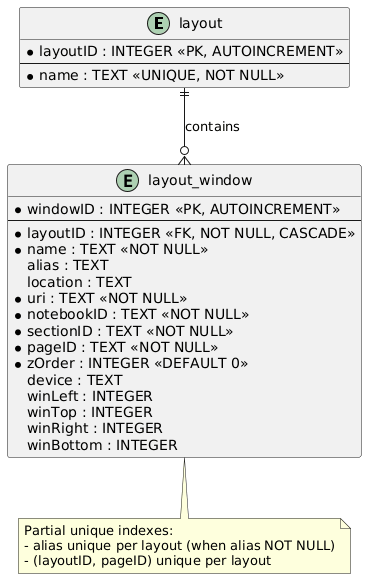
CREATE UNIQUE INDEX idx_layouts_target_page ON layout_window (layoutID, pageID);
This also matches the only pattern this codebase actually uses for named collections — Favorites, Hashtags, and Variables are each a bespoke model + provider, not instances of some shared generic "named list" abstraction. Layouts follows that house style rather than inventing a new one.
What's Actually Shared with Favorites
Even though the data is separate, a few things are genuinely common to "a named reference to a OneNote location that might go stale," so they were factored out rather than duplicated:
- ITargetReference (Commands/Workspaces/TargetReference.cs) — the common shape (Name, Location, Uri, NotebookID, SectionID, PageID, Status) implemented by both Favorite and LayoutWindow.
- TargetChecker (Commands/Workspaces/TargetChecker.cs, renamed from the old FavoritesChecker) — does the auto-path repair (re-resolving stale IDs by walking the Location path) against either collection via InvalidFavorites(FavoritesCollection) or InvalidLayoutWindow(LayoutsCollection), both delegating to a shared InvalidReferences(IEnumerable<ITargetReference>).
- PageAliasDialog (Commands/Workspaces/PageAliasDialog.cs, generalized from RenameFavoriteDialog via a title parameter) — the rename prompt used by both Favorites and Layouts window rows.
- ManageWorkspaceDialog (Commands/Workspaces/) — one host dialog with Favorites and Layouts as tabs (MoreTabControl, ActiveTab property), so users get a single "Manage" entry point instead of two near-identical dialogs.
Everything below that — the schema, the capture/restore verbs, the CLI surface — is Layouts-only.
Capturing a Layout
ManageLayoutsControl's "Capture Layout" button prompts for a name, then enumerates every open OneNote window (SaveLayoutCommand.CaptureWindows, shared with the CLI command) and stages the result in memory as rows in the listview — nothing is written to the database until the user clicks Save. Capturing under a name that already exists overwrites that layout's rows on save rather than creating a duplicate.
A captured window carries more than a page reference: zOrder (its stacking position at capture time) and, where resolvable, device and winLeft/winTop/winRight/winBottom — the literal on-screen rectangle. These are nullable; if geometry can't be determined for a window, the row is still saved with a page reference only.
Restoring a Layout
Restore is intentionally non-destructive: it opens new windows for whatever isn't already open rather than closing or reusing existing ones, per the original issue's "don't reopen the same page twice" requirement. Windows are brought to front in zOrder, so the restored stack looks the way it did at capture time.
Two pieces of Win32/COM plumbing made this harder than it looks:
- Window.WindowHandle isn't always the top-level frame. It can be an inner pane handle, so restoring window bounds requires walking up via Native.GetParent to the actual top-level HWND (GetTopLevelWindow()) before calling SetWindowPos.
- DPI awareness inside dllhost.exe. The add-in runs in a shared COM surrogate, not ONENOTE.EXE, and Scaling.EnablePerMonitorDpiAwareness() isn't reliably effective there. Reading/restoring multi-monitor coordinates correctly requires explicitly forcing PerMonitorV2 around the relevant Win32/Screen calls via Native.ThreadDpiAwarenessScope/Native.SetThreadDpiAwarenessContext, rather than relying on process-wide DPI settings.
The Modal Dialog Problem
ManageWorkspaceDialog is shown with ShowDialog (modal), and modal dialogs block OneNote's main UI thread — MoreForm.RunModeless()'s own doc comment is explicit that a dialog must run modeless to interact with OneNote while open. Wiring "Restore" directly into the modal dialog hung OneNote, because restoring opens new OneNote windows while the dialog still holds the UI thread.
Rather than converting the dialog to modeless, the fix defers the restore until after the dialog is gone: clicking Restore just records the chosen layout's name and closes the dialog like OK. ManageWorkspaceCommand.Execute reads that name off the closed dialog and only then runs RestoreLayoutCommand — by which point the modal hold on OneNote's window is already released.
Database Schema
|
Window Layouts ER (Extract) |
CLI Access
SaveLayoutCommand (SaveLayout --name) and RestoreLayoutCommand (RestoreLayout --name) are both physically organized under Commands/Workspaces/Layouts/, but declared in the flat River.OneMoreAddIn.Commands namespace. CLI dispatch (CommandService.InvokeCliCommand) resolves command types by string via Type.GetType($"River.OneMoreAddIn.Commands.{commandName}") — a hardcoded flat lookup — so any CLI-reachable command has to live in that namespace regardless of which folder it's filed under.
Export / Import
ExportLayoutsCommand/ImportLayoutsCommand mirror Favorites' existing Export/Import commands file-for-file, so layouts round-trip across machines the same way favorites already do.
──────────────────────────────────────────────────────────────────────────────────────────────────
Window Layouts ER PlantUML (Refresh)
@startuml
entity "layout" {
* layoutID : INTEGER <<PK, AUTOINCREMENT>>
--
* name : TEXT <<UNIQUE, NOT NULL>>
}
entity "layout_window" {
* windowID : INTEGER <<PK, AUTOINCREMENT>>
--
* layoutID : INTEGER <<FK, NOT NULL, CASCADE>>
* name : TEXT <<NOT NULL>>
alias : TEXT
location : TEXT
* uri : TEXT <<NOT NULL>>
* notebookID : TEXT <<NOT NULL>>
* sectionID : TEXT <<NOT NULL>>
* pageID : TEXT <<NOT NULL>>
* zOrder : INTEGER <<DEFAULT 0>>
device : TEXT
winLeft : INTEGER
winTop : INTEGER
winRight : INTEGER
winBottom : INTEGER
}
"layout" ||--o{ "layout_window" : "contains"
note bottom of "layout_window"
Partial unique indexes:
- alias unique per layout (when alias NOT NULL)
- (layoutID, pageID) unique per layout
end note
@enduml
#omwiki #omdeveloper #omtechnote
© 2020 Steven M Cohn. All rights reserved.
Please consider a sponsorship or one-time donation to support ongoing development
Created with OneNote.